Set up the relay
You will finish with a vault open in Obsidian, signed in to the relay, and your shared folders arriving.
Before you start you need Obsidian installed and the exact paths of the shares you were given.
1. Provision the vault
Run this on your machine. Point --vault at the folder you want to work in. It is created if it does
not exist yet.
curl -fsSL https://git.psn.virtualcalz.one/virtualcalzone/evc-team-relay-plugin/raw/branch/main/scripts/setup-vault.sh \
  | bash -s -- --vault ~/Documents/Work --shares-file ~/shares.txt
Put one share path per line in shares.txt. You should see the plugin version it installed and the
folders it created.
The script does three things: creates the vault folder, installs and enables the relay plugin, and creates the share folders. Signing in is the only step it cannot do, because your token is stored in Obsidian's local storage and never on disk.
Important
Share paths must match the control plane exactly, including capital letters. A path that differs by case is accepted by the script and then fails later with "settings reference a path that does not exist".
Add --dry-run to see what it would do without writing anything. On Windows use
setup-vault.ps1 -Vault C:\Users\me\Obsidian\Work -Shares 'Personal,RatPG'.
2. Sign in
Open the vault in Obsidian. Then open the relay settings, either way:
- Click the relay icon in the left ribbon. Its tooltip reads Relay settings.
- Press
Ctrl/Cmd+Pand chooseVirtual Calzone Relay: Open settings.
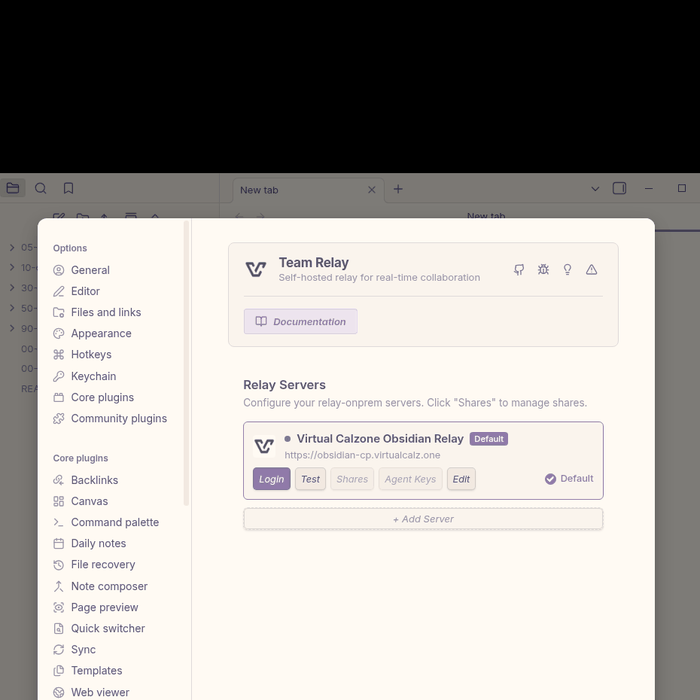
Click Login on Virtual Calzone Obsidian Relay.
Your browser opens the login page. Sign in with Discord and it returns you to Obsidian. The server shows a green dot once you are connected.
3. Accept the invites
Open the notification Obsidian shows you and accept it. The shared folder then appears in your vault with a globe icon.
Invitations are not emailed, so nothing arrives in your inbox.
4. Turn on Other files
Turn on Other files for any share that holds .base files.
Connecting a share is separate from this setting. With it off you receive every note and none of the views, and an empty view looks the same as one whose filter matched nothing.
Keep the plugin current
Run the updater in the same shape. Substitute update-plugin.sh for setup-vault.sh in the URL
above.
curl -fsSL https://git.psn.virtualcalz.one/virtualcalzone/evc-team-relay-plugin/raw/branch/main/scripts/update-plugin.sh \
  | bash -s
- Add
--checkto see the installed version and what would change, without writing anything. - Add
--install --allto install into every vault that does not have the plugin yet. - Add
--forceto update while Obsidian is running. - Add
--ref <tag>to pin a release, or--rollbackto undo the last update.
Updates keep your server, token and share bindings.
Next: Use the PSN apps
If it does not work
Run the checker first. It reports each share as healthy, bound but unhealthy, or not bound at all.
curl -fsSL https://git.psn.virtualcalz.one/virtualcalzone/evc-team-relay-plugin/raw/branch/main/scripts/setup-vault.sh \
  | bash -s -- --vault ~/Documents/Work --verify
| What you see | What to do |
|---|---|
| Signed in, no shares listed | The share folder does not exist in the vault. Re-run step 1, then reopen Obsidian |
| Shares listed but never connected | Run the Relay: Reload relay command, then re-run step 1 |
Notes arrive, .base views do not |
Turn on Other files for that share |
| Red dot, never connects | Sign in again. If it persists, tell us |
| No invite ever appears | Ask whoever is sharing to send it again |