Use the PSN apps
You will finish with the project vault cloned, and a token that lets git fetch it.
Before you start you need authentik-psn-viewers to read, or authentik-psn-users to contribute.
1. Sign in to the git server
Open https://git.psn.virtualcalz.one and click Sign in with authentik.
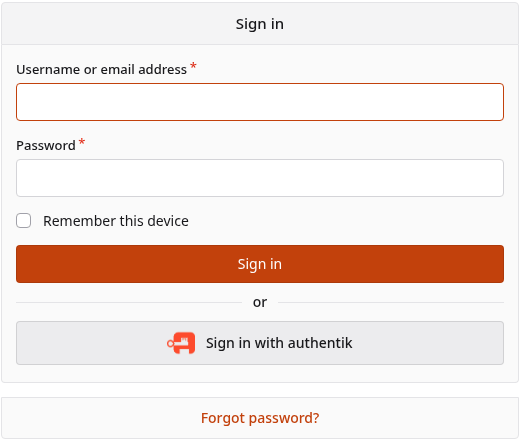
Your repositories are listed when your access is in place.
2. Create an access token
Git will not accept your account password, and its error message does not say so. Make a token instead.
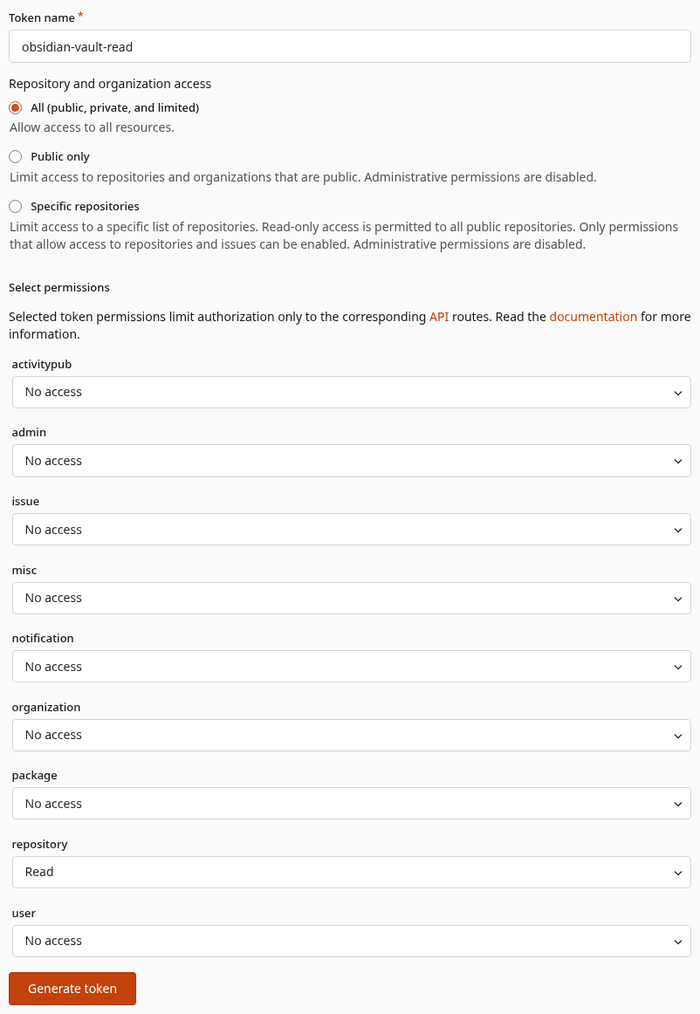
- Open
https://git.psn.virtualcalz.one/user/settings/applications. - Click New access token.
- Name it something you will recognise later, for example
obsidian-vault-read. - Under Repository and organization access, choose All (public, private, and limited).
Public onlycannot see these repositories. - Under Select permissions, set
repositoryto Read. Choose Read and write only if you will push. - Click Generate token, then copy it. It is shown once.
3. Clone the project vault
git clone https://git.psn.virtualcalz.one/psn/psn.git ~/Obsidian-Data/PSN
sh ~/Obsidian-Data/PSN/bootstrap.sh
Enter your Forgejo username and paste the token as the password.
Then follow README.md inside that clone. It covers opening the folder in Obsidian, the trust
prompt, and signing that vault in to the relay.
4. Read the docs site
Open https://docs.psn.virtualcalz.one. There is nothing to install.
This site is gated to authentik-psn-users and authentik-psn-admins, so a reader with only
authentik-psn-viewers is refused here even though the git server accepts them.
If it does not work
| What you see | What to do |
|---|---|
fatal: could not read Username or 403 on clone |
Paste the token, not your account password |
| Signed in, no repositories | Your group has not been added yet. Ask for authentik-psn-viewers |
| The docs site refuses you but git does not | Ask for authentik-psn-users |
| A token cannot see the repositories | It was made with Public only. Make another with All (public, private, and limited) |